

+


Increasing app installs by 400% on Nedbank's new chores app
TIMELINE PLATFORM MY ROLE
Mar 2025- June 2025 Responsive Application Product Designer
Introduction
The Peanuts + Nedbank Chores App is a family-focused financial management app that connects task completion to automatic payments. In the new app we set out to solve the problems below within 3 months.
My Role
I led the design, user testing and development for this project from end-to-end.
Problem
The challenge was to design a chore management experience that encourages participation while subtly introducing younger users to structured financial behaviour and goal-orientated habits.
#1 younger users not understanding finances
Many younger users are introduced to financial responsibility too late, with limited opportunities to build healthy money habits through everyday experiences.
#2 parents overwhelmed with chores
Parents often struggle to create consistent systems that encourage accountability, responsibility and reward-based learning at home. Research showed that habit-building experiences with visible rewards and progress tracking can significantly improve user engagement and task consistency over time.
Defining the problem
How might we design the chore experience into a more engaging and rewarding system that helps younger users build positive habits while introducing foundational financial behaviours in an accessible way?
Goal
BUSINESS GOALS
Increase long-term user engagement
The experience should encourage consistent interaction through routines, rewards and progress-based motivation, helping users build lasting habits over time.
Introduce financial concepts in an accessible way
The platform aims to create an approachable entry point for younger users to engage with concepts, such as earning, saving, responsibility and reward-based behaviour through everyday activities.
Encourage household participation and accountability
By creating clearer visibility around responsibilities and progress, the experience should support more balanced participation within households while reducing friction between parents and children.
USER GOALS
Stay organised and keep track of responsibilities
Users want a simple and structured way to manage daily chores without relying on reminders or manual tracking methods.
Build independence and responsibility
Users want to develop a sense of accountability by managing their own tasks, routines and goals in a more self-directed manner.
Understand the value of earning and saving
Users want an approachable introduction to financial responsibility through systems that connect effort, rewards and goal-setting in a way that feels natural and easy to understand.
Impact
200 000
in 90 days

Device usage of web
traffic as of 2025
phone
37%
tablet
computer
3%
60%
Early Ideation
I did a quick solution sketching where I also established 4 design principles for the new app to make sure I design based on those principles. These principles are centred around our consumers.
Relevance
" This app is relevant to my interests."
In Control
" I get to be in control of my earnings, savings
and spending."
Convenience
" I can easily add and reward my children for tasks completed."
Reliable & Secure
" Familiar brand, secure payments make this app that
more amazing."
4 Design
Principles
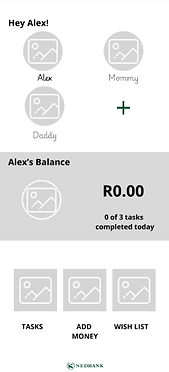
I started sketching some ideas, my focus at this stage is diverge first, converge later.


This is how the early wireframes looked like.



User Testing
I conducted user tests with 5 people not connected to Nedbank. To avoid bias, I changed the brand to "Better, swapped the brand colour to black and tweaked the copy so responses are more accurate.
Here are the results!
5 5 1
Respondents Questions Day's time
Survey Results
Q1 After browsing the app, can you describe what this app is about?
This is an e-wallet 1
This is a chores app for parents and children 5
Not quite sure 3
Q2 How many people do you think use this app?
Less than 1000 1
1000 - 10 000 4
More than 10 000 3
Q3 Do you see yourself using this app?
Yes 5
No 1
From the outcomes from the survey I concluded that informal systems weaken accountability, children respond strongly to visual progress indicators and approval-based structures increase perceived fairness.
Final Designs
Branding
A visual system was developed to balance playfulness for children with trust and clarity for parents.
Colour
Palette
Primary

Neutral

Accent

Buttons


Icon
Set
Typo
Graphy


Final Designs
Finally, a Chores Application! This app is designed to look playful yet not too playful as it has to cater for different use cases.


Development
The development phase focused on transforming early concepts and research insights into a functional, user-centred experience that balanced engagement, usability, and long-term habit formation.
Initial ideas were explored through low-fidelity wireframes to test task flows, reward systems, and navigation structure. Particular attention was given to simplifying interactions for younger users while ensuring the experience remained intuitive and easy to manage for parents.
As the product evolved, the interface was refined to support clearer progress tracking, more engaging reward mechanics, and a visually approachable experience that encourages consistent participation.
Future Steps
With more time, I would expolre:
Adding progress tracking or streaks to encourage consistency in completing chores
Introducing parent notifications and reminders for pending approvals
Providing visual rewardsor milestones to further motivate younger users
